A slow, unreliable, or frequently overheating laptop can make everyday work frustrating. Whether you use your laptop for business, studying, communication, entertainment, or creative projects, poor performance can affect productivity and efficiency. While basic troubleshooting may solve minor problems, recurring issues often require professional attention. Choosing Laptop Repair in Burlington can help identify the underlying causes of performance problems and restore your laptop to better working condition.
Burl–Oak Systems provides professional laptop repair services designed to address hardware, software, performance, and maintenance concerns. With proper diagnosis and practical repair solutions, professional technicians can help your laptop perform more efficiently and potentially extend its useful life.
Understanding Why Laptop Performance Declines
Laptop performance can decrease gradually rather than suddenly. A device that worked quickly when it was new may become slower after years of use. Several factors can contribute to this change.
Common causes include:
- Too many startup applications
- Insufficient storage space
- Outdated drivers or operating systems
- Malware or unwanted software
- Overheating
- Failing hard drives
- Limited RAM
- Battery or power-related problems
- Dust accumulation
- Damaged or aging components
Trying random fixes without identifying the actual cause may waste time or create additional problems. Professional diagnosis helps determine whether the issue is software-related, hardware-related, or a combination of both.
Professional Diagnosis Identifies the Real Problem
One of the biggest advantages of professional repair is accurate diagnosis. A laptop may appear slow because of a software problem, but the actual cause could be an aging storage drive, insufficient memory, overheating, or another hardware issue.
During a professional assessment, technicians can examine different aspects of the laptop, including system performance, storage health, memory usage, operating system issues, temperatures, hardware condition, and software configuration.
This approach allows technicians to focus on the source of the problem instead of simply treating the symptoms.
Burl–Oak Systems can help customers understand what is affecting their laptop and recommend appropriate repair or upgrade options based on the device’s condition.
Removing Unnecessary Software Can Improve Performance
Over time, laptops often accumulate applications, temporary files, browser data, and rarely used programs. Some applications may automatically start when the computer boots, increasing startup time and consuming system resources.
A professional technician can review the system and identify unnecessary programs or processes that may be affecting performance. Removing unwanted software and optimizing startup settings can help the laptop start faster and operate more efficiently.
Avoid deleting system files or essential applications without knowing their purpose. Professional assistance can reduce the risk of accidentally removing something the operating system needs.
Upgrading RAM Can Make Multitasking Easier
Random Access Memory, commonly known as RAM, plays an important role in multitasking. If your laptop has limited RAM, running several applications at once can cause slowdowns.
For example, using a web browser with many tabs while running office applications, video calls, or other demanding programs may place significant pressure on available memory.
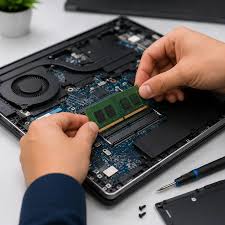
Depending on the laptop model, adding or upgrading RAM may improve responsiveness and multitasking performance. A technician can check whether the laptop supports a memory upgrade and determine what type and capacity are appropriate.
Replacing an Aging Storage Drive
Storage technology can have a major effect on laptop responsiveness. Older laptops equipped with traditional hard disk drives may feel considerably slower than systems using modern solid-state drives.
An SSD can provide faster boot times, quicker application loading, and improved overall responsiveness compared with many older mechanical hard drives.
However, replacing a storage drive requires careful planning. Important files should be backed up before the upgrade, and the operating system and data may need to be transferred properly.
Professional Laptop Repair in Burlington can help ensure that a storage upgrade is compatible with the laptop and completed correctly.
Resolving Laptop Overheating Problems
Heat is another common reason laptops lose performance. When internal temperatures become too high, a laptop may automatically reduce processor performance to protect its components. This can make the device feel unusually slow.
Overheating may occur because of:
- Dust buildup
- Blocked ventilation
- A malfunctioning cooling fan
- Poor airflow
- Dried thermal material
- Heavy workloads
Professional cleaning and cooling-system inspection can help address these problems. Keeping vents clear and ensuring proper airflow can also help the laptop maintain more consistent performance.
Fixing Software and Operating System Issues
Software problems can also cause freezing, crashes, slow startup times, and reduced responsiveness. Outdated drivers, corrupted system files, incompatible applications, and operating system errors may all contribute to performance issues.
A technician can investigate these problems and apply appropriate updates, repairs, or configuration changes.
Keeping the operating system and important drivers updated can also improve security, compatibility, and stability. However, updates should be installed carefully, particularly on business laptops where compatibility with existing applications is important.
Removing Malware and Unwanted Programs
Malware can affect laptop performance while creating security risks. Some malicious or unwanted programs may operate in the background, consume system resources, display unwanted advertisements, or interfere with normal computer operations.
If a laptop suddenly becomes slow, displays unusual pop-ups, crashes frequently, or behaves differently from normal, malware or unwanted software could be a contributing factor.
Professional technicians can inspect the system and use appropriate security tools to identify and remove unwanted threats. Afterward, users should maintain updated security software and follow safe browsing and downloading practices.
Repairing Hardware Problems
Not every performance issue can be solved through software optimization. Faulty hardware can significantly affect a laptop’s reliability and speed.
Examples include:
- Failing storage drives
- Damaged cooling fans
- Faulty RAM
- Keyboard or touchpad problems
- Damaged charging ports
- Battery issues
- Display problems
Professional repair allows technicians to inspect the physical components and determine whether repair, replacement, or upgrading is the most practical option.
Burl–Oak Systems can help laptop users evaluate hardware concerns and choose solutions appropriate for their device and usage requirements.
Professional Repair Can Help Extend Laptop Lifespan
Replacing a laptop every time performance declines can be expensive. In many cases, a properly maintained laptop can continue providing useful service for years.
Professional repair can address smaller problems before they develop into more serious failures. For example, resolving overheating, replacing an aging storage drive, or upgrading memory may significantly improve the usability of an older laptop.
This makes professional repair worth considering when the laptop’s core components are still in good condition.
Why Choose Burl–Oak Systems for Laptop Repair?
Choosing an experienced local service provider can make the repair process easier. Burl–Oak Systems focuses on practical IT and computer solutions for customers in Burlington and surrounding areas.
The goal is not simply to make a laptop work temporarily. Proper troubleshooting should identify the underlying problem and determine the most suitable solution.
Depending on the situation, this may involve software troubleshooting, hardware repair, system optimization, component replacement, data-related assistance, or an upgrade.
Customers can also benefit from professional guidance when deciding whether repairing an existing laptop makes more sense than purchasing a replacement.
Tips for Maintaining Laptop Performance
Professional repair is important when problems occur, but regular maintenance can help prevent many performance issues.
Consider these simple practices:
- Keep your operating system and applications updated.
- Remove programs you no longer use.
- Maintain sufficient free storage space.
- Keep laptop vents clear.
- Use reputable security software.
- Avoid downloading software from questionable sources.
- Back up important files regularly.
- Avoid exposing your laptop to excessive heat or moisture.
- Handle charging cables and ports carefully.
- Have recurring problems professionally inspected.
These habits can help maintain performance and reduce the likelihood of unexpected failures.
When Should You Contact a Professional?
Some laptop problems are easy to troubleshoot, but persistent issues should not be ignored. Consider professional assistance if your laptop repeatedly freezes, overheats, crashes, fails to start, shuts down unexpectedly, runs extremely slowly, or shows signs of hardware failure.
Getting help early may prevent a relatively simple issue from becoming a more expensive repair.
Conclusion
Laptop performance can decline for many reasons, from software clutter and malware to insufficient memory, aging storage, overheating, and failing hardware. Professional diagnosis provides a more reliable way to identify these issues and determine the right solution.
With Laptop Repair in Burlington, users can access professional assistance for troubleshooting, maintenance, hardware repairs, software problems, upgrades, and performance optimization. Burl–Oak Systems helps customers find practical solutions that can improve laptop reliability, responsiveness, and usability.
Instead of continuing to struggle with a slow or unreliable laptop, consider having the device professionally assessed. The right repair or upgrade may help restore performance and allow you to get more value from your existing computer.